Ink & toner · Setup
How to Replace a Printer Drum Unit (And When You Need To)
In this guide · Jump to a section
If your laser printer is producing faded prints, streaks, or black lines down the page, your drum unit may be due for replacement. Here's everything you need to know about printer drum units — what they do, when to replace them, and how to do it.
What Is a Printer Drum Unit?
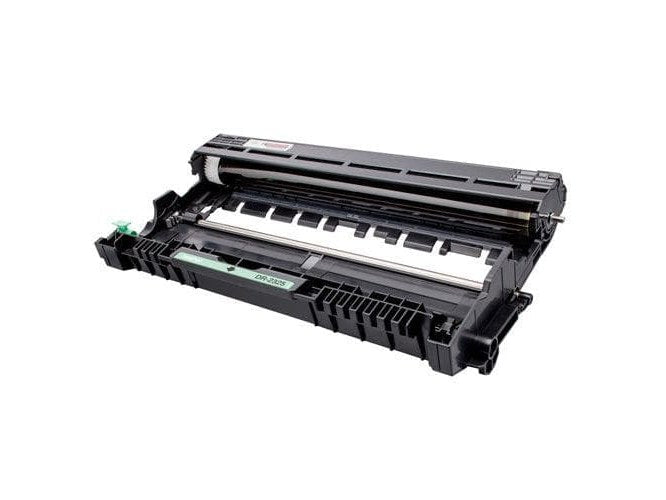
A drum unit (also called an imaging drum or photoconductor unit) is a component inside laser printers that transfers toner onto paper. It works alongside the toner cartridge: the toner holds the powder, and the drum transfers it to the page using an electrostatic charge.
In some printers, the drum and toner are combined into a single cartridge. In others (common in Brother and some Epson laser models), they are separate components replaced independently.
Drum Unit vs Toner Cartridge: What's the Difference?
| Toner Cartridge | Drum Unit | |
|---|---|---|
| Contains | Toner powder (ink) | Photosensitive drum cylinder |
| Replacement frequency | Every 1,000–5,000 pages | Every 10,000–25,000 pages |
| Signs it needs replacing | Faded or light prints | Streaks, lines, smudges, ghosting |
You'll typically replace 3–4 toner cartridges for every one drum unit.
Signs Your Drum Unit Needs Replacing
- Repeated black lines or streaks on every page in the same position
- White spots or voids in printed text or images
- Ghosting — faint duplicate images appearing on the page
- Smudged or blurry prints that don't improve after cleaning
- Drum life warning on your printer's display or software
How to Replace a Printer Drum Unit
The process varies slightly by printer brand, but the general steps are:
- Turn off the printer and open the front or top cover to access the cartridge bay.
- Remove the toner cartridge — on most printers, the drum and toner come out together as a unit first.
- Separate the drum from the toner cartridge (if they are separate components) by pressing the release tab.
- Insert the new drum unit and reattach the toner cartridge.
- Reset the drum counter — most printers require you to reset the drum page count via the printer menu after replacement. Check your printer manual for the exact steps.
- Close the cover and run a test print.
Important: avoid touching the green or blue drum surface with your fingers — skin oils can damage the drum and affect print quality.
How Long Does a Drum Unit Last?
Most drum units are rated for 10,000–25,000 pages, depending on the printer model. Heavy users may need to replace the drum annually; light users may get 3–5 years from a single drum unit.
Shop Replacement Drum Units
Compatible drum units are available for all major laser printer brands at a fraction of the OEM price.
Frequently Asked Questions
Can I replace just the toner and not the drum?
Yes — if your drum is still within its rated life, you only need to replace the toner cartridge. Only replace the drum when you see the symptoms listed above or receive a drum life warning.
Do all laser printers have a separate drum unit?
No. Some printers (particularly HP and many Canon models) integrate the drum into the toner cartridge, so you replace both at once. Brother printers typically have separate drum and toner components.
Will a compatible drum unit work as well as OEM?
Yes — quality compatible drum units are manufactured to the same specifications and deliver equivalent print quality and page life.