Charging & power · Compatibility
Phone Battery Replacement Guide for iPhone and Samsung
Identify the right phone battery or charging option for iPhone and Samsung models, with checks for cases, wireless pads and car chargers.
In this guide · Jump to a section
A phone that fades from a full charge before lunch is frustrating. The right fix depends on the fault: an ageing internal cell, a charging problem, or simply not enough power while travelling.
This phone battery replacement guide explains how to identify an iPhone or Samsung model, separate repair parts from charging accessories, and choose a practical backup. It also covers battery cases, wireless charging and car charging for Australian drivers.
Do not order a battery from a name that only sounds close. Small differences in model, size and connector layout matter, particularly between standard, Plus, Pro and Pro Max phones.
Start by identifying the phone and the fault
Open the phone's settings and record the model name exactly. On an iPhone, the model is shown under General and About. On Samsung phones, About phone lists the model name and often a model number. Photograph that screen before ordering a part.
Next, sort the symptom. A phone that charges only at one angle may have a cable, port or debris issue. A handset that drains while idle may have a worn battery or an app using excessive power. A battery that looks swollen needs prompt professional attention; stop using the phone and do not press the screen back into place.
Internal replacement batteries are repair parts. A charging station, car charger or power-bank case adds power from outside the phone. Each can solve a different day-to-day problem, but none of those accessories changes the cell sealed inside the handset.
iPhone names that must not be treated as equivalents
Apple's names can be easy to skim too quickly. The iPhone 11 and iPhone XS Max are different generations and different shapes. Likewise, an iPhone 14 case is not a fit for the larger iPhone 14 Pro Max. Use the full model wording from the device, then match it to the listing.
| Phone or use case | Correct category to seek | What to check before purchase |
|---|---|---|
| iPhone 11 with poor battery life | Internal replacement battery | The listing must say iPhone 11. |
| iPhone XS Max that drains early | Internal replacement battery | Confirm “XS Max”, not XS. |
| iPhone 14 needing extra runtime | Battery cover case | Match the standard iPhone 14. |
| iPhone 14 Pro Max needing extra runtime | Battery cover case | Match the Pro Max model name. |
| Compatible phone needing desk charging | Wireless charging station | Check wireless charging support. |
The table is a model-name check, not a claim that the listed parts suit any unmentioned phone. If the Settings name differs by even one suffix, pause and find a listing that states that exact device.
Choose between repair power and everyday charging
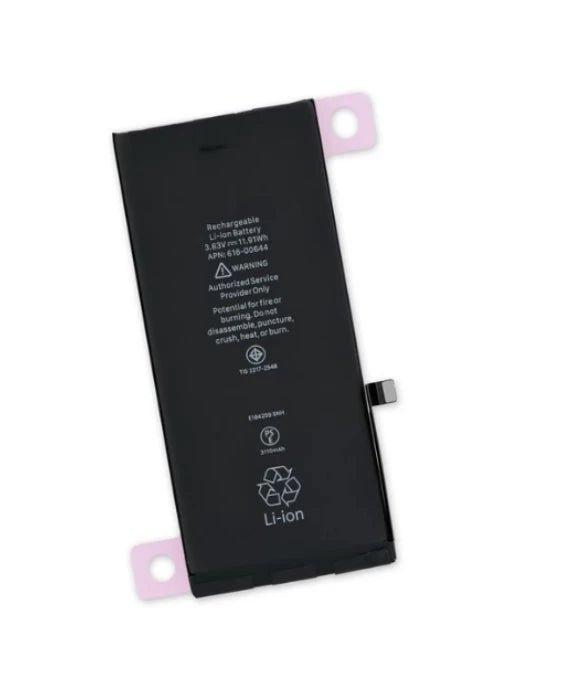
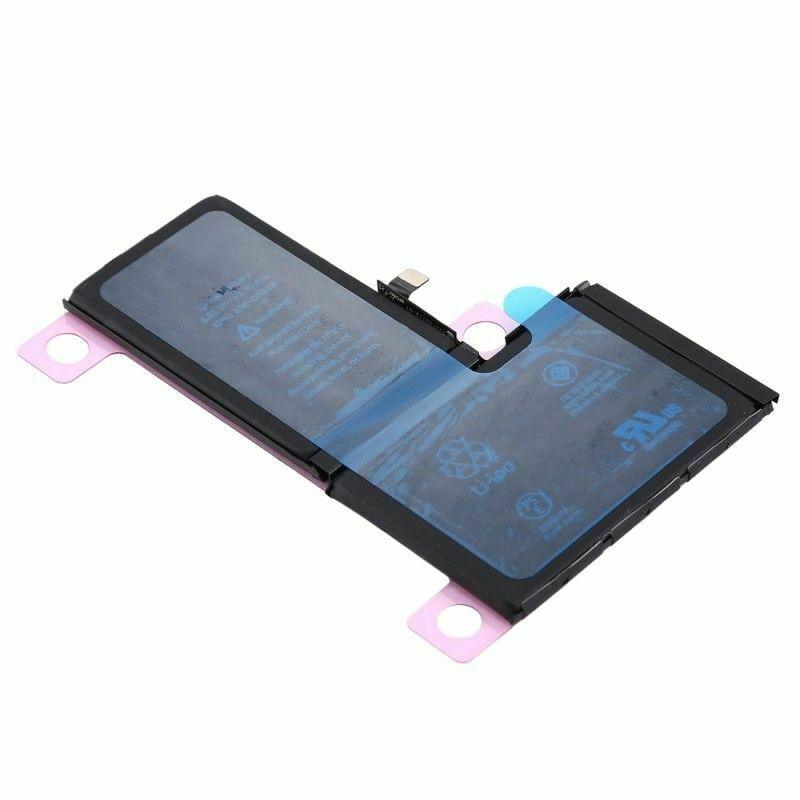
An internal battery is the relevant purchase when the installed cell no longer holds a useful charge and the phone is otherwise worth keeping. The supplied product details for the iPhone 11 battery identify a 3110mAh lithium-ion polymer battery. The XS Max listing also describes a lithium-ion polymer replacement battery with protective circuitry.
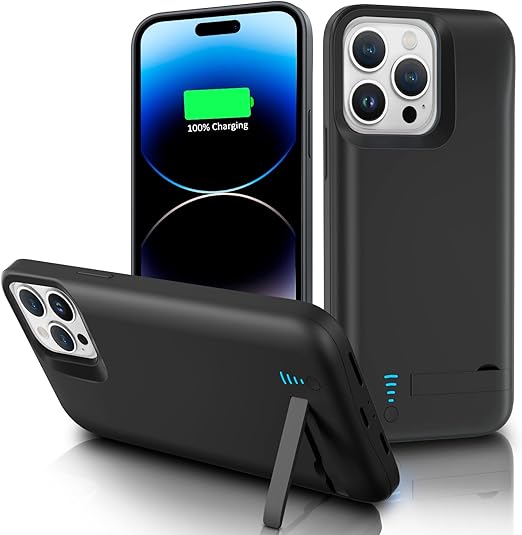
Battery cases are better viewed as mobile reserves. The iPhone 14 case is described with a 4800mAh Li-Polymer battery and LED indicators. The iPhone 14 Pro Max version is described with a 5000mAh integrated Li-Polymer power bank. Capacity figures describe the case battery, not a promise of a fixed number of extra phone hours.
For a shared bedside table, a wireless station can reduce cable clutter. The listed four-in-one unit has a 10W wireless output and is described for phones and watches that support wireless charging. A phone without that capability still needs a wired charging method.
On the road, check the vehicle socket and keep cable ends free of grit. The listed retractable car charger has USB-C and Lightning retractable cables plus USB-A and USB-C ports. Its voltage display is helpful for viewing the vehicle supply, but it is not a diagnosis for a phone battery's health.
Safe handling and charging habits
Back up important data before arranging an internal battery repair. Phone repair involves adhesives, delicate cables and, in many models, a sealed enclosure. If you do not have suitable tools and repair experience, use a qualified technician rather than trying to pierce or bend a battery.
- Use the phone model name as the main compatibility check.
- Keep charging ports dry and clear of packed lint.
- Place wireless chargers on a stable, uncovered surface.
- Disconnect accessories if they become unusually hot.
- Do not use, crush or puncture a swollen lithium battery.
Heat is a useful warning sign, not something to ignore. Remove bulky accessories while troubleshooting a charging issue. If a known-good charger behaves the same way, seek repair advice for the phone rather than repeatedly swapping random cables.
Phone power options available from OfficeCatch
OfficeCatch has parts and accessories for distinct phone-power needs. Pick the repair part only after confirming the exact handset. For travel or a busy family car, select the accessory type that matches how you actually charge.
- iPhone 11 replacement battery for a listed iPhone 11 repair.
- iPhone XS Max replacement battery for the XS Max model.
- iPhone 14 battery cover case with a stated 4800mAh battery.
- iPhone 14 Pro Max battery cover case with a stated 5000mAh battery.
- four-in-one wireless charging station for supported phones and watches.
- retractable four-in-one car charger for USB-C, Lightning, USB-A and USB-C charging.
Before fitting a protective charging case, check that it leaves the camera, microphone and side controls accessible. The case has its own charging routine, so read its indicator lights and instructions. Clean the phone's connector before testing any wired connection through a case.
For Samsung models, the same process applies: record the exact device name, verify wireless charging support where relevant, and select accessories by the stated compatibility. A charger with several connectors is convenient, but it does not make every phone or watch wirelessly compatible.
FAQs
How do I know which iPhone replacement battery fits?
Start with the iPhone model shown in Settings, then compare it with the battery listing. An iPhone 11 battery is not the same part as an iPhone XS Max battery. Check the model name, not just the screen size or the year you bought the phone.
Can I use an iPhone 14 battery case on an iPhone 14 Pro Max?
No. The two phones have different physical dimensions, so choose a case named for your exact handset. A battery case for iPhone 14 is listed separately from the iPhone 14 Pro Max version. Forcing a mismatched case can block buttons, cameras, or connectors.
Why does my Samsung phone not charge on a wireless pad?
First confirm that the phone supports wireless charging and that the pad is connected to a suitable power source. Remove very thick cases, metal accessories, and misaligned rings. Put the phone flat and centred on the charging surface, then check for any phone notification about charging.
Is a car charger a replacement for a phone battery?
No. A car charger supplies power while your vehicle is running, but it does not repair an ageing internal battery. It can be useful for trips or commuting. If the phone switches off early, swells, or loses charge unusually fast, investigate the correct replacement battery.
Products linked in this guide
-
Replacement Battery for iPhone 11 $37.00 NZD View current product details
-
iPhone XS Max Replacement Battery $32.00 NZD View current product details
-
For iPhone 14 Battery Cover Power Bank Charger Case $72.00 NZD · Sold out View current product details
Check the product page for current specifications, compatibility and availability.